Hosted or self-run
Where your agent's logic runs, from a worker on your machines to a flow with nothing to host, and which key each one uses.
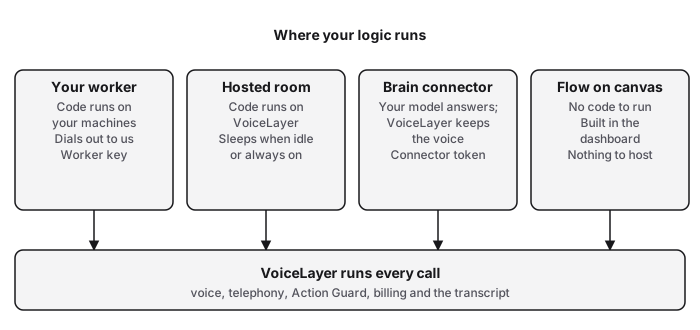
VoiceLayer runs every call: the voice, the phone line, the safety checks, billing and the transcript. What differs is where your logic runs, if you have any.
The four ways
Your worker. You write an agent with the SDK and run its worker on your own machines. It opens one outbound connection to VoiceLayer, so you open no inbound port. It holds a worker key for one environment, never a provider key.
A hosted room. You write the same agent, but run voicelayer deploy --hosted. VoiceLayer runs your code in a sealed room, so there is no worker to operate. The room can only call hosts you list. Deploying uses your API key.
A brain connector. Your own model or text agent writes the replies; VoiceLayer keeps the voice. In tunnel mode a small daemon dials out with a connector token; in direct mode VoiceLayer calls your public endpoint.
A flow on the canvas. You build the steps in the dashboard. Nothing to write and nothing to host. Tool steps can call an API you host.
Which should I pick?
| Your worker | Hosted room | Brain connector | Flow | |
|---|---|---|---|---|
| Where your logic runs | Your machines | VoiceLayer | Your endpoint | Nowhere, the canvas runs it |
| You operate | A worker process | Nothing | The daemon, or a public URL | Nothing |
| Key it uses | Worker key | API key to deploy | Connector token | Dashboard sign-in |
| Provider keys (voice and model) | Saved in Settings → Provider accounts | Same | Same, for the voice | Same |
| Best for | Code that must stay on your network | Code without servers; schedules, saved data, endpoints | An LLM app you already have | Most agents |
Whichever you pick, speech and model provider keys stay with VoiceLayer, never in your process. The exception is a framework brain, which calls its own model from your process with its own key.
Sleep and always on
A hosted agent sleeps after 30 minutes with no call, text, request or schedule run, and is not billed for a room while asleep. The next call wakes it, and the first answer takes a few seconds longer. Always on keeps rooms up every hour at the room's hourly price, and you turn it on knowing that price. Your plan limits how many always-on rooms you can have.